
Blog
How contractors can track job costs before every supplier invoice arrives
You don't have to wait for the supplier's invoice to know what aggregate and hauling have cost a job. Build the number from delivered loads and agreed rates, as the work happens.

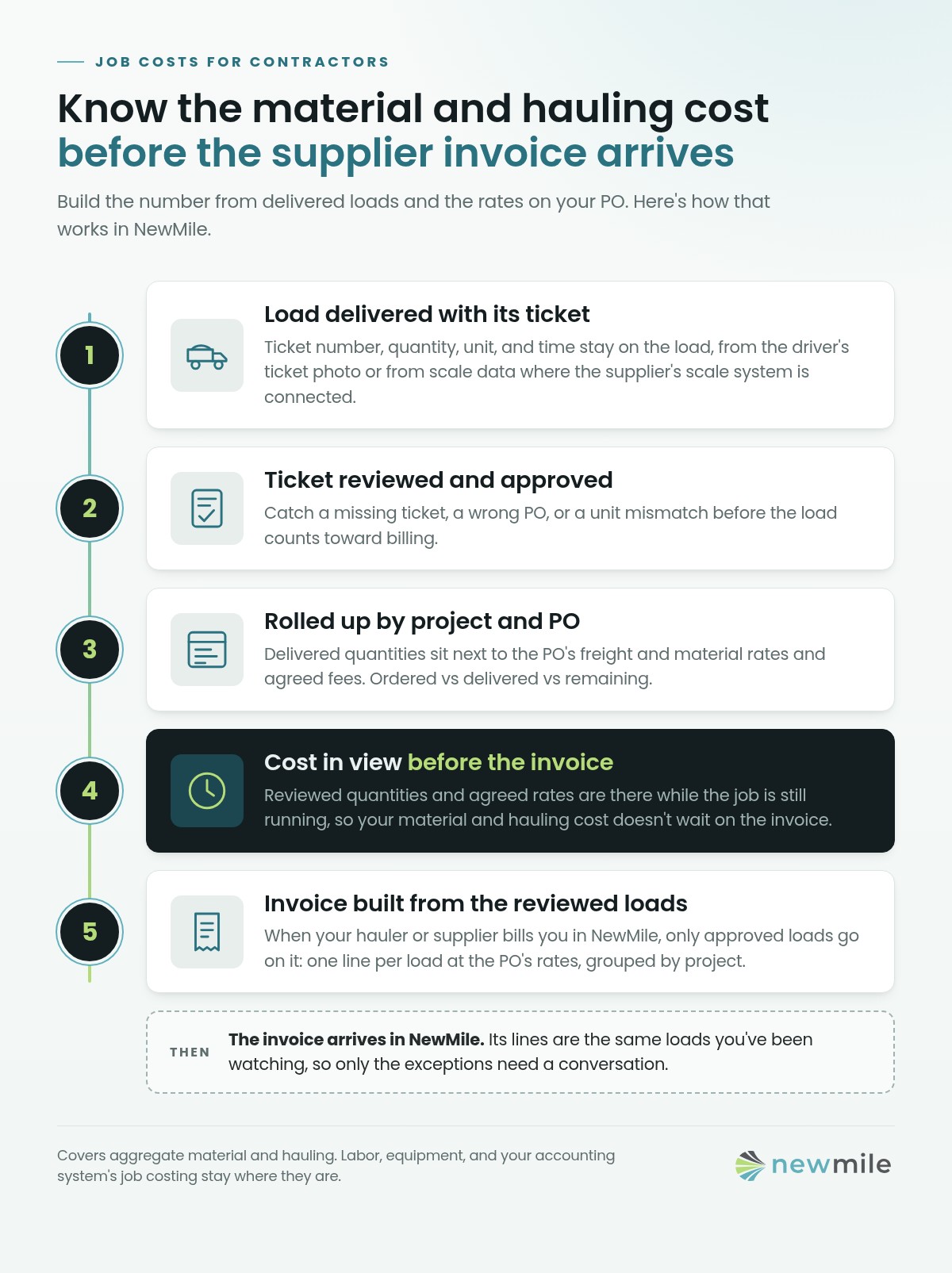
You don’t need the supplier’s invoice to know what a job has cost you in material and hauling. That cost is already on the delivery tickets: each load’s ticket quantity at the rate you agreed on the PO, plus any agreed fees. Add it up by project and PO as the loads come in and you can track the job against its budget while it’s still running. When the invoice finally shows up, it should match what you’ve already reviewed. In NewMile, that math happens for you.
That’s simple on paper. In practice, the tickets sit in a truck or a trailer office, the rates live in a different file, and the real number only comes together at month-end. By then the job has moved on.
Why the invoice is a late signal
A supplier or hauler invoice shows up after the work is done, sometimes weeks after. If that’s when you find out what the job cost, you find out too late to do anything about it. You can’t pull a load back, ask why an order ran over, or fix a rate before it gets billed.
There are three numbers on every material line:
- Ordered. What you asked for on the PO or order.
- Delivered. What actually crossed the scale and reached the job, according to the tickets.
- Billed. What the supplier or hauler invoices you for.
Most cost surprises live in the gaps between those three. Delivered is the one you can know first, so build from it.
Build the cost from the load ticket
Every delivered load already has what you need:
- The quantity on the ticket (tons, yards, loads, or hours).
- The agreed rate for that unit, from the PO.
- Any agreed fees, such as a fuel surcharge or dump fee.
Quantity times rate, plus fees, is that load’s cost. Add the loads up and you have a running cost for the material line, the PO, and the project. NewMile does this automatically for every delivered load, so nobody has to rebuild it in a spreadsheet.
Two habits keep the number honest:
- Keep material and freight separate. The price of the stone and the price of hauling it are different rates, often charged by different companies. Mixing them hides where an overrun came from.
- Watch the units. A PO priced per ton doesn’t add up correctly from tickets counted in loads or yards. Catch unit mismatches when the ticket arrives, not when the invoice does.
Review tickets as they land, not at month-end
A running cost is only as good as the tickets under it. Look at them every day, while people still remember the load. The usual exceptions:
- A load with no ticket, or a ticket that can’t be read
- A ticket on the wrong job or PO
- A quantity in the wrong unit, or one that doesn’t make sense for the truck
- The same ticket number showing up twice
Each of these is easy to fix the day it happens and hard to fix three weeks later on an invoice dispute. Our guide to digital scale tickets covers why paper makes this harder and how ticket photos keep the proof attached to the load.
Roll it up by project and PO
Once tickets are reviewed, total them where you make decisions:
- By PO: ordered vs delivered vs remaining for each material and hauler.
- By project: delivered quantity and cost to date for each material, tracked against the budget you set.
This shows you an overrun while the job is still running. If a base course line is running well past plan halfway through the job, you want to know this week, not at closeout.
Match the invoice when it arrives
When the invoice does come in, checking it is quick. It should equal the reviewed loads for that period times the agreed rates, plus agreed fees. If it does, approve it. If it doesn’t, the difference points straight at the problem: a load you don’t have, a ticket you rejected, a rate that changed, or a fee you didn’t agree to. You’re working from a list of loads, not a stack of paper. When the hauler or supplier bills you through NewMile, the invoice is built from that same list.
Where NewMile fits
NewMile is built for this part of the job: aggregate material and hauling. For contractors, it:
- Records every load with its ticket. Ticket number, quantity, unit, time, and the ticket photo stay attached to the load. Ticket data can also come straight from the supplier’s scale system where it’s connected.
- Keeps the agreed rates on the PO, with freight and material as separate rates.
- Lets tickets be reviewed and approved before they count toward billing, so exceptions get caught early.
- Prices every delivered load at the PO rate, plus agreed fees, and rolls it up by project and PO, so you can track cost against budget while the job is running.
- Shows load status in real time, so you see what’s en route, delivered, or late.
- Builds invoices from those same loads. When a hauler or supplier bills you through NewMile, only loads that passed ticket review and pricing review can go on the invoice. Each line ties back to its load at the PO’s rates, and invoices are grouped by project. You can see what you’ve received in NewMile, download PDFs, and export the list to CSV.
That changes what checking an invoice means. You aren’t matching paper against a separate list of loads. The invoice lines are the loads you’ve already been watching, so the only things left to talk about are the exceptions.
Two limits to be clear about. NewMile covers aggregate deliveries, not labor, equipment, or subcontract costs. It also doesn’t replace your accounting system’s job costing. It gives that system, and your project team, a reviewed record of what was delivered and at what rate, before the invoice gets there. See how it works for contractors.
FAQ
How can I track construction job costs before all supplier invoices arrive? Build material and hauling costs from delivery tickets instead of invoices. Each delivered load’s cost is its ticket quantity at the PO rate, plus any agreed fees. Review tickets as they arrive, track the running total by project and PO against your budget, then check each invoice against it when it comes in. NewMile prices each load and tracks it against budget for you.
What’s the difference between ordered, delivered, and billed quantities? Ordered is what you asked for on the PO. Delivered is what the tickets show actually reached the job. Billed is what the supplier or hauler invoices. Tracking delivered quantity as it happens lets you see overruns and billing differences before the invoice arrives.
Should material and freight costs be tracked separately? Yes. The material price and the hauling rate are different numbers, often from different companies. Keeping them separate shows whether an overrun came from more stone, more trucking, or a rate change. NewMile tracks them separately: each PO carries its own material and freight rates, so the split is there for every load.
How often should contractors review delivery tickets? Daily, while the loads are fresh. Missing tickets, wrong jobs, unit mismatches, and duplicate ticket numbers are much easier to fix the day they happen than during an invoice dispute.
What should I do when an invoice doesn’t match my delivered loads? Compare it load by load against your reviewed tickets and the agreed rates. The difference usually comes down to a missing or rejected ticket, a rate that changed, or an unexpected fee. Settle those items with the supplier or hauler rather than reworking the whole invoice.
Can a supplier’s invoice be built from the loads I’ve already reviewed? Yes, when your hauler or supplier bills you through NewMile. Only loads that passed ticket review and pricing review can be invoiced. Each line ties back to its load at the PO’s rates, and invoices are grouped by project. You can see received invoices in NewMile, download them as PDFs, and export the list to CSV.
Does NewMile replace my job-costing or accounting software? No. NewMile tracks aggregate orders, loads, tickets, rates, and the invoices built from them across contractors, haulers, and suppliers. Your accounting system still handles full job costing, including labor and equipment. More on NewMile for contractors.
If you want to see your own projects and POs tracked load by load, request a demo. It’s a short walkthrough with no commitment.
See the whole picture on a walkthrough.
A 15-minute demo on loads, tickets, and invoices — no commitment.